
Approvals Management app is designed to simplify and streamline all approval-related tasks for Microsoft Dynamics 365 users. It enables users to review, approve, or reject workflow requests, such as Purchase Orders and Purchase Requisitions directly from their mobile or desktop devices, without needing to log into the full D365 application.
Accessible through the Power Apps platform, the app can be easily downloaded from the Microsoft Store (Windows), App Store (iOS), or Google Play Store (Android), making it a convenient solution for managing approvals anytime, anywhere.
Streamlining Approvals with Microsoft Dynamics 365
In today’s fast-paced business environment, every decision counts, especially in the supply chain, where a single delay in approving a purchase requisition or purchase order can impact operations. To simplify and accelerate these processes, Microsoft Dynamics 365 Supply Chain Management offers the Approvals Management mobile app, enabling decision-makers to review, approve, or reject workflow requests anytime, anywhere.
A Purchasing Manager’s Story
Imagine Anika, a Purchasing Manager at a Fremont Fulfilment Co. Her day involves approving multiple purchase requisitions and purchase orders for raw materials and vendor supplies. Earlier, these approvals required logging into the full Dynamics 365 environment or relying on emails, often delaying decisions.
Now, with the Approvals Management mobile app, Anika can review, approve, or reject workflow requests instantly, whether she’s in a supplier meeting, on-site, or traveling between plants.
Let’s look at Anika’s day in action:

One busy Friday afternoon, while Anika is traveling to a client site, her phone buzzes with an urgent message from her Purchasing Team.
“Hi Anika, we just created a purchase order for steel sheets, It’s critical for tomorrow’s production run. The vendor is holding inventory, but they need approval in D365 before dispatch. Can you please review it?”
Anika instantly realizes the challenge, she’s not in front of her laptop, and accessing the full Dynamics 365 Supply Chain Management environment remotely isn’t practical while on the move. A delay in approval could stall an entire production line.

Before she can worry further, her colleague Rahul reminds her as
“Anika, you can approve from your phone! Use the Approvals Management app, it connects directly to D365 approvals.”

Anika opens the Approvals Management mobile app and signs in using her D365 credentials. Within seconds, the dashboard displays all pending approvals, including the urgent purchase order flagged by her team.
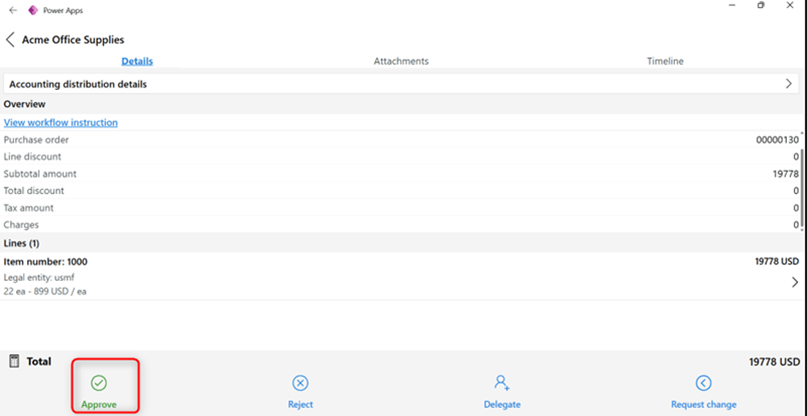
She taps on the order, reviews every detail such as vendor name, quantities, pricing, and even the attached quotation all from her phone. Confident that everything is in order, she taps ‘Approve’
Approvals Management App Launch:

- Download the Dynamics 365 Approvals Management App from the Microsoft Store.
- Go to Power Platform admin center and sign in using your email ID. Select the environment where you want to install the app.
- Once the environment is selected, install the app. The installation process usually takes 1- 2 minutes to complete.
- After the installation is successful, share the app with the respective users so they can access it using their own email IDs.
Some of these steps may require assistance from your system administrator, especially actions performed on the Power Platform.
Once installed, the app’s interface is clean, modern, and easy to navigate, a truly polished user experience.
User Setup
Before using the app, users must have the right security roles in D365 Supply Chain Management. These roles define what kind of approvals a user can manage:
- Buying Agent – Manages purchase orders.
- Purchasing Agent – Manages purchase requisitions.
- Purchasing Manager – Manages both orders and requisitions.
- System Administrator – Has full access to all approval requests.
Once the roles are assigned, users can sign in using their Microsoft Power Apps domain account to begin managing approvals.
Key Features that Keep Work Flowing
Approvals Management offers a streamlined and intuitive experience with features designed for flexibility and control:
- View pending approvals directly on your dashboard.
- Approve, reject, or delegate requests with a single tap.
- Request modifications from submitters when changes are needed.
- Delegate multiple requests at once, perfect for busy periods or handovers.
This not only saves time but ensures approval workflows continue without interruption.
Exploring the Home Page
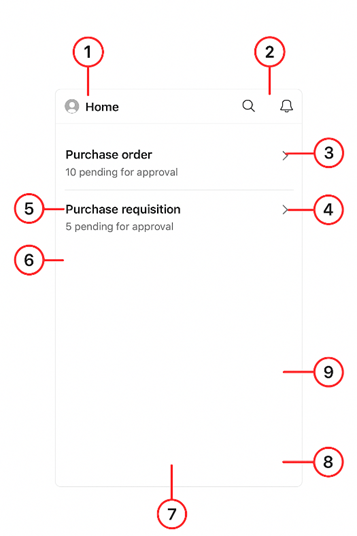
When users sign in, the Home Page provides a clear snapshot of everything awaiting attention. Key UI elements include:
1. About Button – Opens app details such as version information, terms, and conditions.
2. Navigator – Provides a drop-down to move between main app areas (Home, Purchase Orders, Purchase Requisitions).
3. Search – Allows users to search documents by order number, vendor name, vendor account, legal entity, or item number.
4. Alerts – Displays new notifications. A red dot indicator shows unread alerts that require attention.
5. Purchase Orders Section – Shows the total number of purchase orders currently pending approval.
6. Purchase Requisitions Section – Displays the number of purchase requisitions awaiting review or approval.
7. Filter – Filter the list by defining specific values to look for. This capability is useful on pages that shows longer lists.
8. Sort – Lets users sort requests by document type, vendor, or other criteria.
9. Refresh – Updates the list of requests. The data also auto-refreshes every 30 seconds for real-time visibility.
Advanced Capabilities: Deep-Dive into Approvals
Approvals Management app offers more than just quick approvals. it’s a complete decision support tool for supply chain leaders.
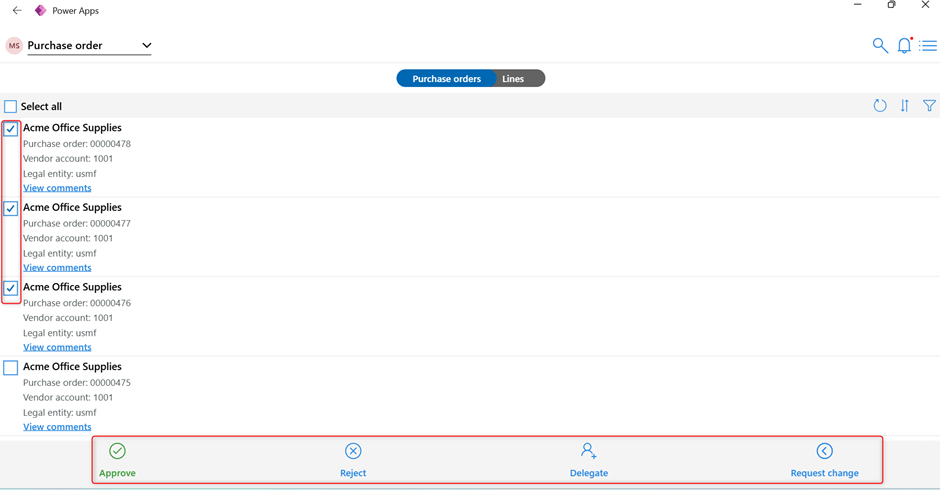
With the latest updates, users can now Approve/Reject/Delegate/Request change multiple work items simultaneously, helping distribute workload effectively.
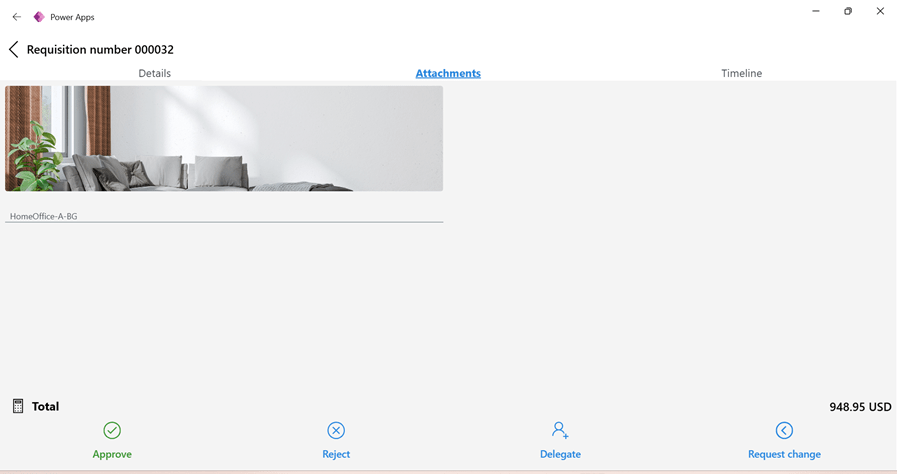
Open attachments to validate before approval.
Review line-level details of each purchase order, requisition, such as item, quantities, and pricing.

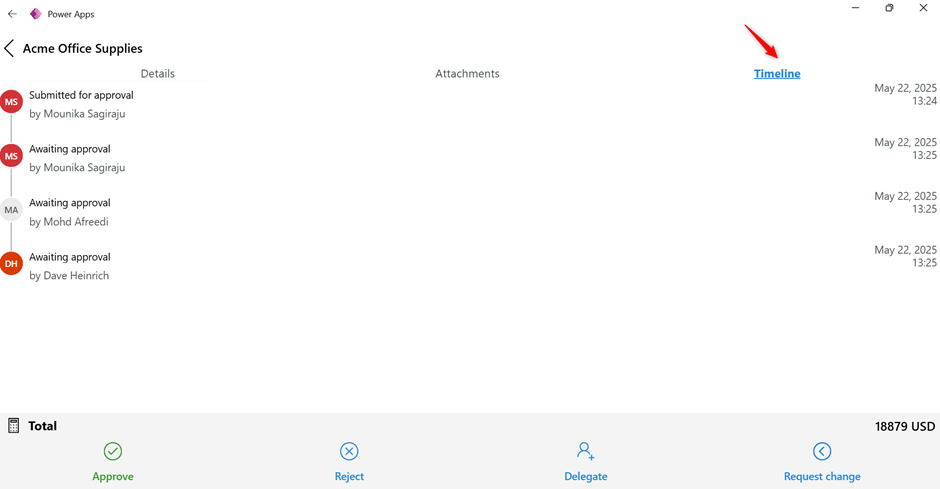
Access the timeline to track every workflow stage, submission, delegation, rejection, and final approval.
Takeaway
Approvals Management mobile app is not just a convenience tool. it’s a productivity booster. It empowers Supply Chain professionals to stay connected to their workflows, make timely decisions, and maintain process continuity from anywhere.
Whether you’re managing purchase orders or requisitions, the app ensures you remain in control, enabling a seamless and efficient approval experience across your organization.
References
Approvals Management mobile app overview – Supply Chain Management | Dynamics 365 | Microsoft Learn
 Dynamics Guide
Leave a comment