

Hello Everyone,
Welcome to my next blog. This blog is short, but can it be important to any business organizations. In this blog, Lets discuss on order event setup in sales and marketing module to track the actions that users take in customer orders.
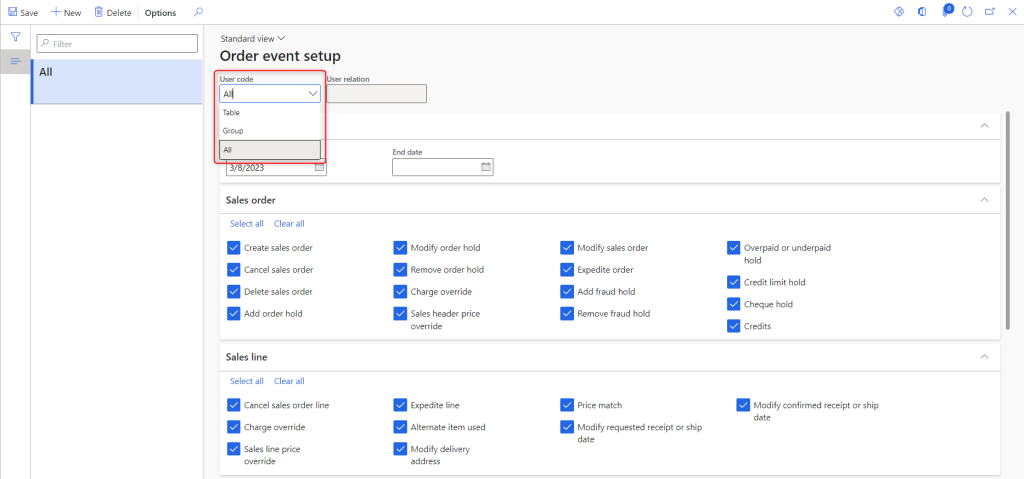
Setup: Sales and marketing> Setup> Events> Order events

Create a new order event with the required user code.
- Table: A specific user.
- Group: Group of users.
- All: All users.
I am configuring user code as All users and selected all event types to be tracked.
Now, Let’s create a new sales order right after the setup and track the sales order event logs.

Now that the sales order has been created with line items, Quantity and unit price, we can go to Sales and marketing> Inquiries and reports> History> Order events. As you can see from the highlighted image below, a “Create sales order” event has been logged for sales order number “SO/23/00028”.

Now let me modify the sales order line with Unit price from 555 to 600 and reconfirm the sales order.
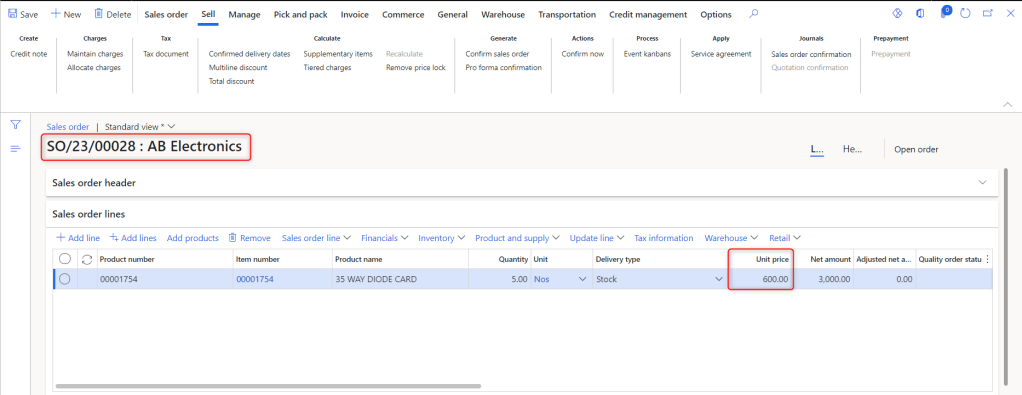
If I go back to the sales order events, we are able to see changes in sales price from 555 to 600 also the change is tracked and displayed in the event log as shown below.

If a sales order taker is taking enquiries from a customer on a specific sales order, Users can review order events for that specific order by clicking on sales inquiry in the View section.
That’s it for this blog, I hope the above information of order events is easy and useful to track in Dynamics 365.
 Dynamics Guide
Leave a comment